
Guide · updated 2026-11-13
Shopify SKU and barcode: how to set them up
A Shopify SKU is a code you make up to track a variant inside your store. A barcode is a standard code, like a UPC or EAN, that identifies the product outside it. You can set both on every variant. Here's where to add them, what Shopify allows, and how to name SKUs so they stay clean.
Shopify SKU vs barcode: the short answer
A SKU (stock keeping unit) is an internal code. Shopify says you can use it to track inventory and report on sales. You choose it. A barcode identifies the product more widely, for example in the supply chain or on online marketplaces. Shopify says SKUs and barcodes are separate, and you can use both on the same product.
| SKU | Barcode | |
|---|---|---|
| Who makes it | You | Usually a standard body or the manufacturer |
| Used for | Internal inventory tracking and sales reports | Identifying the product in the supply chain and on marketplaces |
| Set per | Variant | Variant |
| Must be unique | Yes, within your store | The same value can't be used twice on the same product or variant |
| How many per variant | One | Up to 20 |
| Format | Free text, short is better | Typed: GTIN, UPC, EAN, ISBN, ASIN, Custom or NS-PID |
In Shopify POS, you can find a product by scanning or searching any of its barcodes, or its SKU.
How to add a SKU in Shopify
SKUs live on variants. A product with no variants has one SKU. A product with three sizes and four colors has 12 variants, so it needs 12 SKUs.
- Go to Products and open the product.
- Select the variant in the Variants section.
- In the Inventory section, click SKU.
- Enter the SKU and save.
You can also set SKUs when you create a product, or in bulk with the bulk editor or a CSV import (both below).
What Shopify says about SKU rules
- Unique. Shopify says each product and variant must have its own unique SKU. Duplicates can cause problems with third-party integrations and inventory tracking. Shopify shows a warning, which you can ignore for things like bundles.
- Short. Shopify suggests no more than 16 characters. A format of 4 to 8 characters can work for a smaller catalog.
- Letters and numbers. Use numbers, or numbers and letters. Avoid look-alikes such as 0 and O, or 1 and I.
- No special characters or spaces. Shopify says they can cause search problems. Dashes and underscores are fine for separating parts.
- Case-sensitive.
ABC123andabc123count as different SKUs.
A simple SKU scheme
You don't need a tool for this. Pick a pattern, write it down, and apply it the same way every time. Shopify's own tips point the same way: short, no spaces, dashes to separate attributes.
A pattern that works for most small stores is category, product number, option codes:
| Part | Example | Meaning |
|---|---|---|
| Category | TEE | T-shirts |
| Product number | 014 | Your 14th T-shirt |
| Color | BLK | Black |
| Size | M | Medium |
| Full SKU | TEE014-BLK-M | Black medium, T-shirt 14 |
- Keep the same number of characters in each part, so SKUs sort well.
- Never reuse a SKU, even after you delete a product.
- Don't put prices, dates or supplier names in it. Those change.
- Keep the list of codes (BLK, WHT, S, M) in one sheet.
Shopify barcode: formats and where to enter it
Enter barcodes in the Barcode field of the Inventory section. For a product with variants, Shopify says you add barcodes to each variant. Each product or variant can hold up to 20 barcodes, so codes from different suppliers or regions can sit side by side.
| Type | Length | Note |
|---|---|---|
| GTIN | 8, 12, 13 or 14 digits | Internationally recognized product identifier |
| UPC | 8 or 12 digits | Mostly retail in North America |
| EAN | 8 or 13 digits | Mostly retail outside North America |
| ISBN | 10 or 13 characters | Books and e-books; may include X |
| ASIN | 10 letters or digits | Amazon's internal catalog number |
| Custom | Up to 255 characters | The default. For Code 39, Code 128 and similar |
| NS-PID | Up to 255 characters | Non-standard manufacturer IDs on EU customs declarations |
What Shopify does with barcodes
- A barcode registered with GS1 is set to the GTIN type automatically. If the product name and vendor don't match the GS1 listing, you see a warning.
- If a Custom barcode is a valid GTIN, Shopify suggests switching the type. You can accept or dismiss it.
- Some sales channels might require a GTIN before you can publish a product.
- Barcodes scanned with Shopify POS can be used to publish products on the Google & YouTube channel.
Don't invent a UPC or EAN. Real ones come from the manufacturer or from GS1. If you have no standard code, leave the barcode blank. Your SKU still tracks the variant.
Shopify bulk edit SKU and barcode
Shopify says you can add or change SKUs and barcodes in the bulk editor or with a CSV import. Use the bulk editor for a few dozen variants. Use a CSV for hundreds.
| Column | What it holds | Note |
|---|---|---|
| SKU | The SKU of a variant | Can't be blank if you use a custom fulfillment service |
| Barcodes | Up to 20 barcodes, separated by semicolons | Add a type prefix such as gtin: or upc:. No prefix imports as Custom |
| Barcode (older) | A single barcode | Replaced by Barcodes on your next export. A file with both columns fails to import |
Always start from a fresh export so you get the current headers. Variant columns like SKU depend on the Option1 name and Option1 value columns. If those are missing, Shopify says it creates a new default variant and deletes the existing ones. Changing an option value deletes the old variant and creates a new one. For the full import steps, see the Shopify CSV import guide, or start from the free product CSV template.
The SKU column is for product data. To change stock quantities by CSV, use the inventory file instead. That's covered in how to import inventory to Shopify.
Supplier and marketplace SKUs when you import
Products you copy from a supplier or marketplace often carry the seller's SKU. Don't assume it fits your scheme. Two suppliers can use the same code for different items, and Shopify wants SKUs unique across your store.
- Check before you publish. Look at the SKU on each imported variant. Blank, duplicated or odd-looking codes are easy to fix at this stage.
- Replace with your own. Using your scheme means a dropped supplier doesn't break your reports.
- Keep the original. If you need the supplier code to place orders, store it in a sheet next to your SKU. Don't rely on memory.
- Keep barcodes honest. Copy a barcode only if it is the real code for that product.
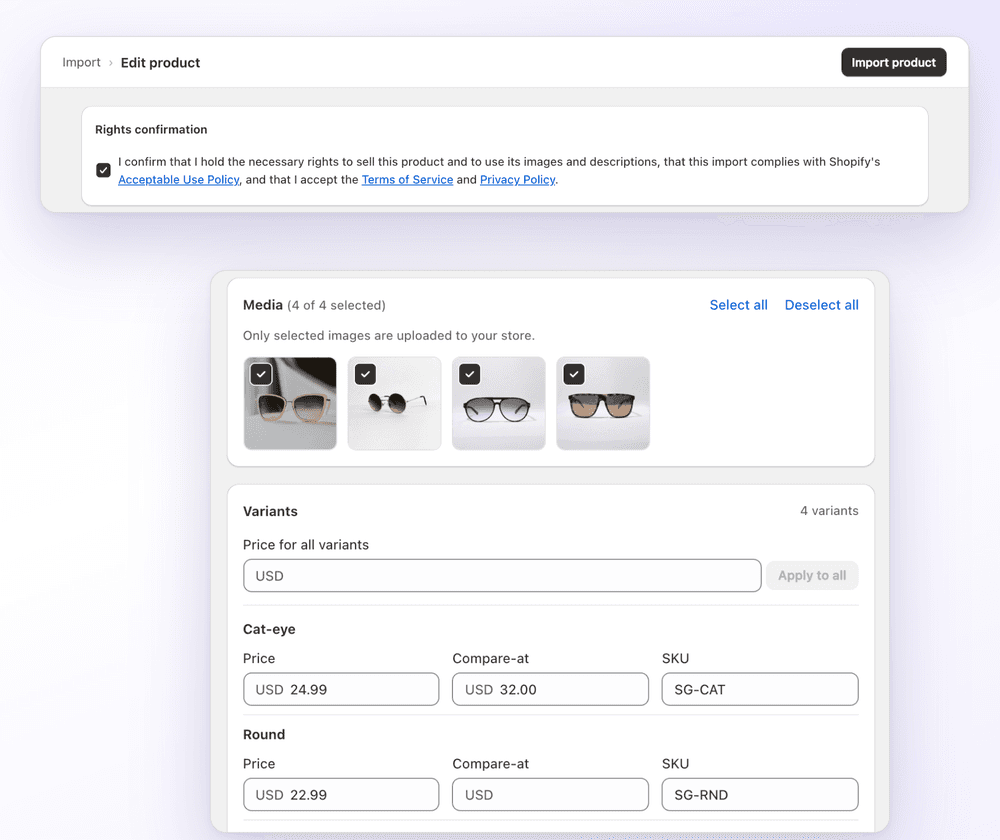
With 1Click, you can edit the SKU per variant in the product editor before import, and use Apply to all to set it across variants. You still choose the SKUs yourself. 1Click doesn't generate SKUs or barcodes, and it doesn't sync stock after import.
FAQ
Shopify SKU and barcode: how to set them up: FAQ
Still stuck? Email contact@ecomfusion.net.
What is a SKU in Shopify?
A SKU is a code you assign to a variant to track inventory and report on sales. Shopify says each product and variant must have its own unique SKU.
Do Shopify SKUs have to be unique?
Yes. Shopify says SKUs within your admin must be unique. If you enter a duplicate, Shopify shows a warning, which you can ignore for cases like bundles. Duplicates can cause problems with integrations and inventory tracking.
What's the difference between a SKU and a barcode?
A SKU is your own internal code. A barcode, such as a UPC, EAN or ISBN, is a standard identifier used across the supply chain and on marketplaces. Shopify treats them as separate fields, and you can use both on one variant.
How long can a Shopify SKU be?
Shopify suggests no more than 16 characters, with 4 to 8 working for smaller catalogs. It also recommends avoiding spaces and special characters, and notes that SKUs are case-sensitive.
Can I use a SKU generator in Shopify?
This guide doesn't cover a generator tool. You don't need one: pick a pattern like category, product number and option codes, such as TEE014-BLK-M, and keep a sheet of your codes.
Do I need a barcode to sell on Shopify?
No, you can leave it blank. Some sales channels might require a GTIN before you can publish a product, so check the channel you plan to use.
Related

Importing products with their own SKUs?
Paste a product link and 1Click imports the variants. Edit the SKU, price and compare-at price per variant first. Free for 3 imports.