
Guide · updated 2026-11-13
Shopify Variant Limit: How Many Variants and Options a Product Can Have
A Shopify product can have up to 2,048 variants and up to 3 options. The old limit of 100 variants is gone, but some themes and apps still stop there. Here's what counts toward each limit, how variants look in a CSV file, and what to do when a product needs more.
What is the Shopify variant limit?
Up to 2,048 variants per product, and up to 3 options per product. Both numbers come from Shopify's variants help page. The variant limit doesn't depend on your plan: Shopify's developer changelog announced it for all merchants on October 15, 2025.
| Limit | Number | Notes |
|---|---|---|
| Variants per product | 2,048 | All merchants. The limit used to be 100. |
| Options per product | 3 | For example Size, Color and Material. |
| Media items per product | 250 | Images and other media, shared by all of the product's variants. |
| Media items per variant | 1 | It must come from the product's own media list. |
| New variants per day | 10,000 | Only for stores with 500,000 or more variants, when uploading by app or CSV file. Doesn't apply on Shopify Plus. |
Options, option values and variants
These three words get mixed up, and the limits apply to different ones.
- Option: a way the product varies, such as Size or Color. Up to 3 per product.
- Option value: one choice inside an option, such as Small or Blue.
- Variant: one combination of option values that a customer can buy, such as Small / Blue. Up to 2,048 per product.
If you sell every combination, the number of variants is the number of values in each option multiplied together. A shirt in 6 sizes and 10 colors has 60 variants. Add 4 materials and it has 240. So a third option is what pushes most products toward the limit: 20 colors, 10 sizes and 11 materials would be 2,200 variants, which is over 2,048.
Each variant must be unique. Shopify won't save an exact duplicate of a variant that already exists.
What happened to the 100 variant limit?
For years, a Shopify product could have only 100 variants. Shopify raised that to 2,048 for all merchants in October 2025. The 3-option limit didn't change.
How variants look in a CSV file
In Shopify's product CSV, every variant is one row. Rows with the same Handle belong to the same product. The option names go on the product's first row, and each row carries its own option values, SKU and price.
| Handle | Title | Option1 Name | Option1 Value | Option2 Name | Option2 Value | Variant SKU | Variant Price |
|---|---|---|---|---|---|---|---|
| cotton-tee | Cotton T-Shirt | Size | S | Color | Black | TEE-S-BLK | 19.99 |
| cotton-tee | S | White | TEE-S-WHT | 19.99 | |||
| cotton-tee | M | Black | TEE-M-BLK | 21.99 | |||
| cotton-tee | M | White | TEE-M-WHT | 21.99 |
The same pattern repeats for a third option. In Shopify's current CSV format the same columns are named URL handle, Option1 name, Option1 value, SKU and Price. Shopify says it stays backward compatible with older column names, so use the header row from your own export or from our Shopify CSV template and don't mix the two.
A product with one variant still fills in an option: Shopify's CSV help says its option value should be Default Title. The full import process is in the Shopify CSV import guide, and the CSV checker finds duplicate variants before you upload.
What to do when a product needs more than 3 options
Shopify won't store a fourth option on a product. These are the ways around it, simplest first.
- Combine two options into one. Size and Fit can become one option with values like "M / Slim" and "M / Regular". The number of variants stays the same, but you free up an option.
- Split the product. Turn one option into separate products, such as a "Cotton T-Shirt" and a "Linen T-Shirt", each with Size and Color. Each product gets its own 3 options and 2,048 variants.
- Use line item properties for choices that don't need their own price, SKU or stock. Shopify suggests customizing your theme code to collect line item properties, such as engraving text. The choice is saved with the order line, not as a variant.
- Use a product options app. Shopify points to third-party apps in the Shopify App Store for products with more than 3 options or more than 2,048 variants.
- On Shopify Plus, use combined listings. The Shopify Combined Listings app groups separate products into one listing. A combined listing can have up to 3 options on top of the options of each product in it.
What to do when a product has more than 2,048 variants
- Drop values you don't sell. A variant only needs to exist if a customer can buy it. Remove colors or sizes that were never stocked.
- Remove combinations that don't exist. If the XXL size only comes in two colors, don't create it in all twenty.
- Split the product, as above. Two products of 1,100 variants each are both under the limit.
- Move a choice out of the variants into line item properties or an options app, if it doesn't affect price or stock.
Splitting has a cost: each product has its own page, URL and inventory, so link the split products to each other in their descriptions or put them in one collection.
Price, SKU and image for each variant
Every variant has its own price, compare-at price, SKU, barcode and inventory quantity. You set them on the product page in Shopify admin, or in the variant's row in a CSV file.
Images work differently. A product can hold up to 250 media items, and each variant can have one of them applied. The image has to be in the product's media list first. In a CSV file, the variant's image URL goes in the Variant Image column (Variant image URL in the current format).
Importing a marketplace product with many variants
Marketplace listings often have more variations than you want in your store. Check these before you import one, whatever tool you use.
- Count the options. If the listing varies in more than 3 ways, decide which options to combine or split before you import.
- Count the variants. Over 100, test your theme and apps. Over 2,048, the product has to be split or trimmed.
- Check each variant's price. Larger sizes or other models often cost more at the source. Don't apply one price to everything without looking.
- Give each variant a SKU you can match to the supplier's variation when an order comes in.
- Check variant images. Each variant can show one image, so pick the one that matches its color or style.
- Remove variants you won't sell after the import, so customers can't order them.
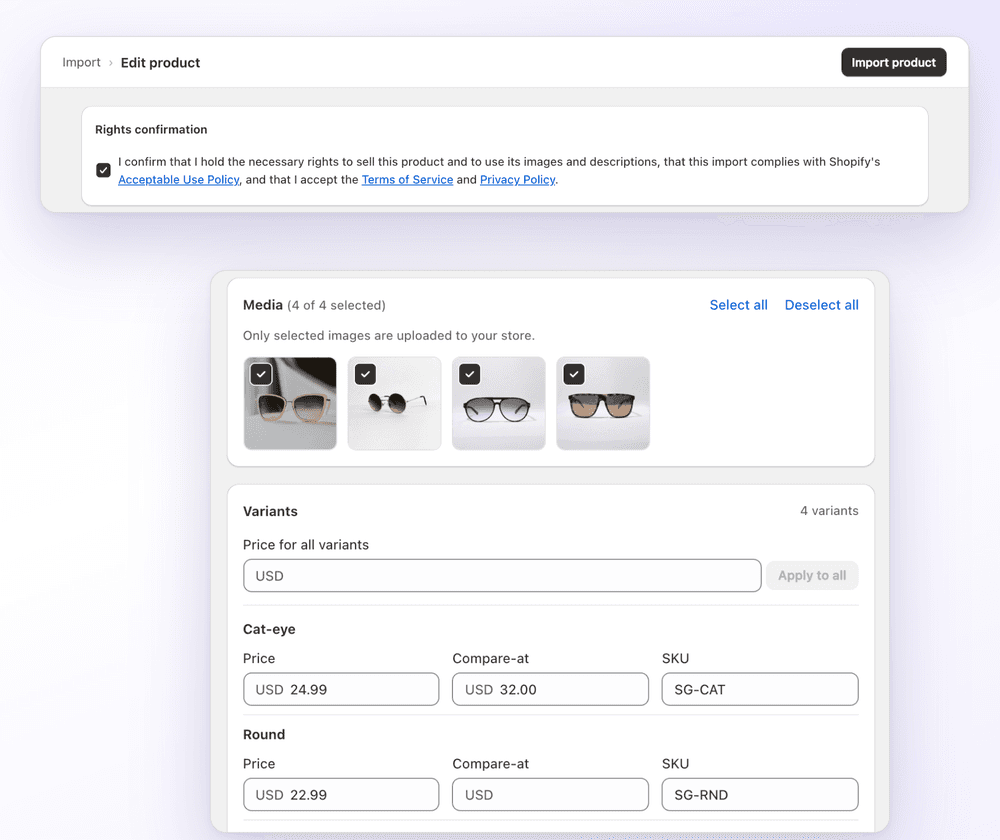
If the product is on Amazon, AliExpress, eBay or a Shopify store you manage, 1Click imports its variants and prices from the product link. Before anything is created, you can set the price, compare-at price and SKU of each variant in the editor, or use Apply to all to fill a value in for every variant at once. Shopify's limits still apply to the product that gets created. It's free for 3 imports (pricing).
Moving a whole catalog from another platform is a CSV job instead. See, for example, Squarespace to Shopify.
FAQ
Shopify Variant Limit: How Many Variants and Options a Product Can Have: FAQ
Still stuck? Email contact@ecomfusion.net.
How many variants can a Shopify product have?
Up to 2,048. Shopify raised the limit from 100 for all merchants in October 2025. Some themes, apps and sales channels might not support more than 100 variants, so test a large product before you publish it.
Does Shopify still have a 100 variant limit?
No. The limit per product is now 2,048 variants on every plan. The number 100 still matters in practice, because Shopify says some third-party themes, apps and sales channels might not support more than 100 variants.
How many options can a Shopify product have?
Up to 3, such as Size, Color and Material. That limit didn't change when the variant limit went up.
Can I have more than 3 options on a Shopify product?
Not as built-in product options. You can combine two options into one, split the product into several products, collect extra choices as line item properties through your theme code, or use a third-party product options app. On Shopify Plus, the Shopify Combined Listings app adds up to 3 options on top of each product's own. See more than 3 options.
Is there a limit on how many variants I can add per day?
Only for very large stores. Shopify says a store with 500,000 or more variants can add up to 10,000 new variants a day when uploading by app or CSV file. The daily limit doesn't apply on the Shopify Plus plan.
Can each variant have its own price and image?
Yes. Each variant has its own price, compare-at price, SKU, barcode and inventory. Each variant can also have one media item applied, which must come from the product's media list.
Related

Importing products with variants?
Paste a product link and 1Click imports the variants and prices. Set price, compare-at price and SKU per variant before import. Free for 3 imports.